
Cozy Roblox pet-shop management tycoon
Pet Store Tycoon Wiki
Build a thriving pet store, keep adorable animals happy, and welcome customers to your growing shop. Stock shelves, unlock new pets, decorate your space, and team up with friends.
- Launched Jun 6, 2026
- Updated Oct 2026
- 9.1M+ Visits
- 95.7% Positive Ratings
- 8 Players per Server
Popular Pages
Trending Now
Codes
Boost your shop's growth with the latest Pet Store Tycoon codes. Redeem these active rewards for free cash and Deluxe Pet Packs to maximize your profits today.
Read more
How to Play
Master the basics of Pet Store Tycoon on Roblox, from managing your register and restocking shelves to hiring staff and expanding your store.
Read more
Sell Pets
Learn how to manage your animal inventory, adjust enclosure settings, and sell pets in Pet Store Tycoon on Roblox to maximize your store's efficiency.
Read more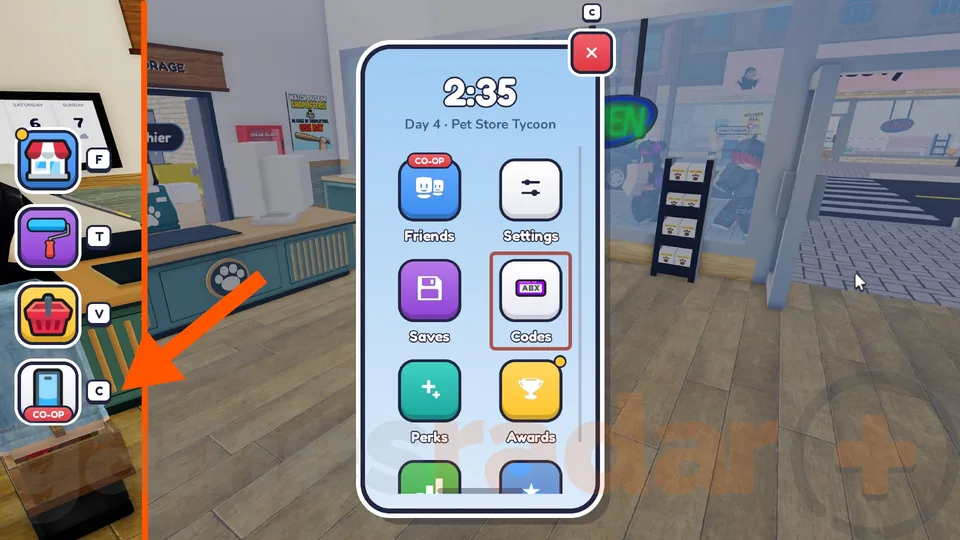
Daily Quests
Master Pet Store Tycoon on Roblox with our guide to completing daily quests, managing your store efficiently, and using codes to grow faster.
Read moreStore Layout
Master your Pet Store Tycoon store layout with expert tips on anti-robber placement, customer flow, and maximizing every shelf.
Read moreLevel Up Fast
Learn how to level up fast in Pet Store Tycoon on Roblox. Discover optimal checkout workflows, inventory management, staff automation, and daily habits that raise your store level.
Read more
What is Pet Store Tycoon?
Pet Store Tycoon is a Roblox simulation and management tycoon created by already arrived studios. Players build a pet retail business while feeding, cleaning, and playing with animals, stocking shelves, and serving shoppers.
The game lets you unlock new pets, expand and decorate your store, and share shop duties with friends. The 2026 experience uses Roblox Place ID 118845698633260 and is separate from other games with the same name.
Browse guides- Developer
- already arrived studios
- Platform
- Roblox
- Genre
- Simulation / Tycoon
- Release Date
- Jun 6, 2026
- Visits
- 9.1M+
- Favorites
- 138K+
- Peak CCU
- 41,084
- Positive Ratings
- 95.7%
- Server Size
- 8
- Platforms
- Roblox
- Genres
- Simulation, Tycoon
- Players
- 1–8
- Modes
- Single player, Co-op
- Release date
- 2026-06-06
- Developer
- already arrived studios
Latest Updates
- BuildingPet Store Tycoon Best Decoration and Profit Optimization Guide
- BuildingHow to Build the Biggest Store in Pet Store Tycoon: Expansion Tips
- BuildingPet Store Tycoon Builds: Ultimate Guide to Designing and Growing Your Roblox Pet Shop
- BuildingHow to Build and Manage Your Pet Store in Pet Store Tycoon
Start Here
- 1
Beginner Guide
Follow the opening tutorial and learn how to prepare your first animals, stock products, open the shop, and serve your first customers.
- 2
Money Making & Restocking
Learn how merchandise, customer service, and regular restocking help keep sales flowing before you spend on upgrades.
- 3
Pet Care & Happiness
Master feeding, cleaning, and playing with pets so your store stays welcoming as you unlock more animals.
- 4
Store Expansion & Upgrades
Plan your next animal unlock, new space, display layout, and shop decorations without neglecting daily operations.
Pet Store Tycoon Wiki Hub
Eight research-backed hubs covering codes, pets, money, care and store growth in Pet Store Tycoon.
Explore the wiki
Guide
Learn how to play Pet Store Tycoon from the first tutorial to a profitable shop: opening routines, store basics and practical tips.
Progression
Grow faster in Pet Store Tycoon with money-making routines, level-up workflows, daily quests and reward extras like likes and group bonuses.
Building
Plan and grow your Pet Store Tycoon shop: expansions, layouts, remodeling, decorations and build ideas from first shelves to the biggest store.
Staff
Hire and manage Pet Store Tycoon staff: unlock employees, assign cashiers and stockers, and run the staff menu while you focus on the shop.
Pets
Every animal in Pet Store Tycoon: getting pets from packs, unlocking birds, cats and fish, selling pets and keeping them fed and happy.
Resources
Official and community resources for Pet Store Tycoon: the Roblox page, Discord server, ratings, player counts and where to follow updates.
Media
Watch Pet Store Tycoon in action: 100-day challenges, ASMR sessions, no-commentary gameplay and live streams from the community.
Codes
Every reported Pet Store Tycoon code for October 2026, with reward details, status and the exact redeem steps from the in-game phone menu.
Pet Store Tycoon Codes
Find the latest Pet Store Tycoon codes for free Deluxe Pet Packs, temporary Cashier rewards, and other bonuses. Check reported code status, compare reward details, and learn how to redeem codes through the in-game Phone menu.
WHALE
NewDeluxe Pet Pack according to Pro Game Guides and Destructoid. GamesRadar+ instead reports a 30-minute Cashier, so the exact reward is disputed.
SNEK
ActiveDeluxe Pet Pack and a free 30-minute Cashier, as announced by the developer in the Reptile Update.
PETS
ActiveDeluxe Pet Pack. GamesRadar+ additionally reports a $500 cash reward.
Pet Store Tycoon Beginner Guide
Learn how to start your first pet store, care for animals, stock merchandise, and serve customers. Follow the essential beginner progression from completing the tutorial to earning money and expanding your business.
Launch the game and finish the tutorial
Launch Pet Store Tycoon by already arrived studios, Roblox Place ID 118845698633260, and complete the introductory tutorial.
Claim your first pets
Follow the tutorial prompts to obtain your first pets and learn how the animal-care system works.
Feed, clean and play
Feed, clean, and play with your pets to keep them happy.
Stock the shelves
Stock your store shelves with merchandise and prepare to serve visiting customers.
Serve customers and reinvest
Serve customers, earn money from your store, and reinvest in unlocking new animals and expanding your shop.
Redeem codes in the phone menu
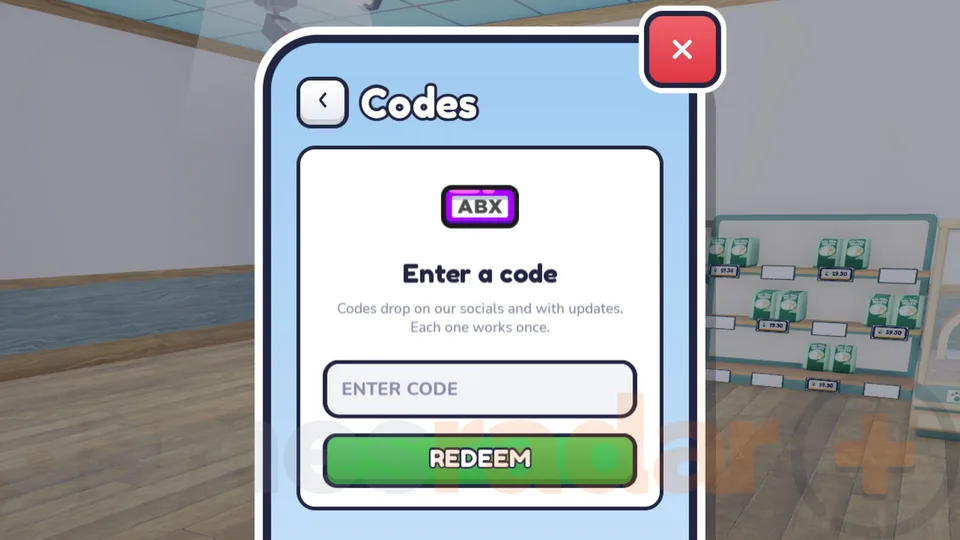
Open the in-game Phone with C on PC, select Codes, and redeem available promotional rewards.
Pet Store Tycoon Latest Updates
Explore confirmed Pet Store Tycoon updates, including the Ocean Wing expansion and the Reptile Update. See officially announced features, progression requirements, and promotional codes associated with each update.
Ocean Wing
NewThe developer announced on October 10, 2026, that the Ocean Wing can now be unlocked.
WHALE Code
The official Ocean Wing announcement includes the promotional code WHALE, without specifying its reward.
Reptile Update
UpdateThe October 4, 2026 developer announcement confirmed the addition of reptiles and three new enclosures.
Level 30
All three newly announced reptile enclosures unlock at store Level 30.
SNEK Rewards
The Reptile Update announcement offers a free Deluxe Pet Pack and a 30-minute Cashier through the SNEK code.
Pet Store Tycoon Pets and Pet Packs
Discover how pet packs provide animals for your store and how additional animal categories become available through progression. Learn about Deluxe Pet Packs, fish, reptile enclosures, and the relationship between animal care and pet sales.
Deluxe Pet Pack
A promotional pet pack available through reported codes including SNEK and PETS. The developer specifically confirms a Deluxe Pet Pack reward for SNEK.
Fish
Fish are among the animals identified in pet packs by Pro Game Guides. Animals obtained through packs can be cared for and sold in the store.
Reptiles
NewA pet category added in the October 2026 Reptile Update, with three new enclosures unlocking at Level 30.
Animal Unlocks
The official game description confirms that additional animals become available as players progress and expand their stores.
Pet Sales
Pro Game Guides confirms that animals obtained from Deluxe Pet Packs can be cared for and sold to earn money.
Pet Store Tycoon Money Guide
Learn how to generate store revenue by serving customers, keeping shelves stocked, and selling pets obtained through packs. Use these confirmed gameplay mechanics to build a sustainable business before investing in additional animals and store expansions.
Keep animals happy
Keep your existing animals fed, clean, and happy as part of the store's regular management routine.
Restock merchandise shelves
Restock merchandise shelves so customers have products available to purchase.
Serve every customer
Serve visiting customers to generate revenue through normal store operations.
Sell pets from packs
Obtain animals from pet packs and sell eligible pets for additional store income.
Claim promotional rewards
Claim available promotional rewards such as Deluxe Pet Packs to supplement your normal progression.
Reinvest your earnings
Reinvest your earnings into unlocking additional animals and expanding your store.
Pet Store Tycoon Expansion Guide
Learn how store expansion fits into Pet Store Tycoon's progression system and discover confirmed expansion milestones. Explore animal unlocks, the Level 30 reptile enclosures, the Ocean Wing announcement, and the Growing Pains achievement.
Run the daily store loop
Operate your existing store by caring for pets, stocking shelves, and serving customers to earn money.
Unlock animals and space
Use your store earnings to unlock additional animals and expand your available shop space.
Open the Ocean Wing
Follow the officially announced Ocean Wing expansion, which became unlockable in the October 10, 2026 update.
Reach store Level 30
Reach store Level 30 to unlock the three reptile enclosures introduced in the Reptile Update.
Fill the block for Growing Pains
Work toward the Growing Pains badge by purchasing every store expansion and filling the entire block.
Pet Store Tycoon Pet Care Guide
Master the three animal-care activities explicitly described by the developer: feeding, cleaning, and playing with pets. Understand how to incorporate these tasks into your daily store operations while managing shelves and customers.
Feed your pets
Feed your pets using the available animal-care interactions to keep them happy.
Clean pets and surroundings
Clean your pets and their surroundings whenever the game presents cleaning tasks.
Play with your pets
Play with your pets as part of the core animal-care gameplay loop.
Check needs while restocking
Continue checking your pets' needs while restocking store merchandise and serving customers.
Keep the routine manageable
Maintain a manageable animal-care routine as additional pets become available through store progression.
Pet Store Tycoon Achievements and Badges
Explore Pet Store Tycoon achievements covering store operations, long-term progression, animal collection, and expansion milestones. Learn the requirements for named Roblox badges and use them to set meaningful gameplay goals.
Open for Business
Open your pet store for the first time.
Regular Hours
Run your pet store for 30 in-game store days.
Growing Pains
Purchase every available expansion and fill the entire block.
Top Dog
Reach store Level 10 and unlock dogs as a new animal category.
Better Together
Operate a pet store together with a friend through the game's cooperative multiplayer system.
Pet Store Tycoon FAQ
Common questions about Pet Store Tycoon, answered for Roblox players building and managing their first pet shop.
What is Pet Store Tycoon on Roblox?
Pet Store Tycoon is a shop-management simulation by already arrived studios, created on June 6, 2026. You care for pets, stock merchandise, serve customers, and expand or decorate your store.
How do you get started in Pet Store Tycoon?
Follow the opening tutorial, care for your first pets, stock products on shelves, and serve customers. Check the in-game prompts before making purchases, as costs and unlocks can change.
Which Pet Store Tycoon codes are available in October 2026?
Guides updated through October 12, 2026 list WHALE, SNEK, and PETS. SNEK and PETS are reported to reward Deluxe Pet Packs; reports disagree on the WHALE reward, and code availability can change.
How do you redeem codes in Pet Store Tycoon?
Complete the tutorial, press C on desktop or select the phone icon, open Codes, enter the code exactly, and choose Redeem. A code can expire or be limited to one use per account.
Can you play Pet Store Tycoon with friends?
Yes. The official game description encourages running a store together, and the game lists a maximum of eight players per server.
What devices can run Pet Store Tycoon?
The Roblox listing says the experience supports desktop computers, mobile devices, tablets, and consoles through Roblox. No separate Steam release for this specific experience has been confirmed.
How do you unlock new animals and expand your store in Pet Store Tycoon?
Continue caring for pets, stocking shelves, and serving customers, then use the available in-game unlocks and expansion options. The official Roblox description does not list complete costs or unlock requirements, so check prices inside your current game.
Is this Pet Store Tycoon the same as the DantesDivine game?
No. This wiki covers the game by already arrived studios, Roblox Place ID 118845698633260. DantesDivine has a separate same-name game at Place ID 5254674128, so its codes and progression should not be mixed with this one.
Ready to Master Pet Store Tycoon?
From keeping your first pets happy to running a busy shop with friends, find the guides you need to grow your store and manage every new unlock.